
Epson EcoTank ET-2803 Wireless Color All-in-One Supertank Printer
4.2Editor score
Cartridge free printing system
Up to two years ink included
Hands free voice activated printing
This guide compares the top ten ink tank printer models for home and office use, highlighting features, reliability, and cost savings for buyers.
Finding the right printing solution can transform your daily workflow and reduce long-term costs significantly. Ink tank printers offer a compelling alternative to traditional cartridge models by utilizing refillable reservoirs. These devices are designed to handle high volumes of pages without frequent interruptions for ink replacements or expensive consumables.
We have carefully evaluated ten leading ink tank printers based on their performance, ease of use, and overall value proposition. Each model was assessed for print quality, connectivity options, and the convenience of the ink refill process. Our goal is to provide a clear picture of what each device brings to the table.
Every selection in this list showcases unique strengths tailored to different user needs and budget constraints. We highlight key specifications and user feedback to help you make an informed decision. Please note that product availability and specific offers may change frequently, so checking current listings is advisable.
4.2Editor score

4.1Editor score

4.1Editor score
This side-by-side comparison highlights the key specifications and features of the top ten ink tank printers available today.




The Canon MegaTank G3270 stands out as a reliable all-in-one wireless color printer designed for home and small office environments. With a rating of 4.1 stars, it offers a compelling mix of performance and cost efficiency that appeals to budget-conscious buyers.
We may earn a commission when you buy through this link, at no additional cost to you.
Its standout quality lies in the massive ink capacity which includes up to two years of ink right out of the box. This feature alone can save users up to one thousand dollars on ink over the lifetime of the printer. The ability to print up to 6000 black and white pages and 7700 color pages ensures that frequent printing jobs are handled without interruption.
While the device lacks automatic duplex printing which means you must manually flip pages for double-sided jobs this trade-off is acceptable given the significant savings on consumables. The single-sided printing capability is straightforward and the wireless connectivity ensures that multiple devices can access the printer easily.
This printer is ideal for students, families, or small businesses that need high volume printing without the recurring expense of traditional cartridges. Its simple design and low maintenance requirements make it a practical choice for users who want reliable output without technical complexity.
By eliminating the need for frequent cartridge replacements this printer drastically reduces the total cost of ownership over time.
Users can print from various devices seamlessly without needing physical cables or complicated network configurations.
We may earn a commission when you buy through this link, at no additional cost to you.
The Epson EcoTank ET-2803 is a wireless color all-in-one Supertank printer that redefines how home users approach document and photo printing. Rated at 4.2 stars it combines innovative technology with practical features to deliver sharp text and vibrant images consistently.
We may earn a commission when you buy through this link, at no additional cost to you.
Its key strength is the cartridge free printing system where each ink bottle set replaces about eighty individual cartridges. This dramatic shift saves money and reduces waste significantly. The printer includes enough ink for up to two years meaning users can print thousands of pages before needing a refill.
The unique Micro Piezo Heat Free technology ensures that the print head remains cool and durable over time. This results in consistent quality for both text documents and colorful graphics. While the initial setup involves filling tanks which can be slow once done the benefits of reliability are clear.
This model is perfect for eco conscious users or those who print frequently and want to avoid the hassle of changing cartridges. The hands free voice activated printing adds convenience for smart home integration making it a modern choice for varied printing needs.
By using refillable tanks users contribute to reducing the amount of plastic cartridge waste ending up in landfills.
Voice activated features allow for seamless printing from smart devices without physical interaction with the machine.
We may earn a commission when you buy through this link, at no additional cost to you.
The HP Smart Tank 5003 is designed to be the last printer you will ever need for home use. With a rating of 4.1 stars it promises easy reliable printing with minimal maintenance requirements. It stands out as a best-for-home option due to its extensive included ink and AI capabilities.
We may earn a commission when you buy through this link, at no additional cost to you.
Its standout quality is the full supply of ink included right out of the box which covers up to three years of typical home printing. This eliminates the anxiety of running out of ink unexpectedly. The mess free refill system ensures that users can replenish ink without squeezing or spilling bottles.
While the upfront cost might be higher than some competitors the long-term savings and convenience justify the investment. The AI capable features add a layer of intelligence to the printing process ensuring sharp text and richer colors consistently. Borderless prints and mobile wireless printing options enhance its versatility.
This printer is ideal for users who want a hassle free experience and are willing to pay a premium for reliability and advanced features. It is particularly suited for families or home offices that require consistent high-quality output without technical complications.
The design allows for easy access and quick refilling of ink tanks without the mess usually associated with traditional cartridges.
AI capable features help optimize print quality and settings automatically for various document types and media.
We may earn a commission when you buy through this link, at no additional cost to you.
The Canon Megatank G3290 is an all-in-one wireless printer that offers a slightly more feature-rich experience than the G3270 model. Rated at 4.2 stars it is designed for users who value convenience and high volume output without sacrificing quality or ease of use.
We may earn a commission when you buy through this link, at no additional cost to you.
Its standout quality is the auto two-sided printing feature which saves paper and time automatically. This is a significant upgrade over models that require manual page flipping. The 2.7 inch LCD color touchscreen provides a modern intuitive interface for navigating settings and print jobs easily.
Like its sibling it includes up to two years of ink and can print up to 6000 black and white and 7700 color pages. The wireless connectivity ensures seamless integration with multiple devices making it suitable for busy home environments. The higher price reflects these added conveniences.
This printer is perfect for users who want the ease of double-sided printing and a larger interface to manage their tasks. It is ideal for home offices or households that frequently print documents and need a reliable device with minimal manual intervention.
Auto two-sided printing reduces paper consumption and simplifies the process of creating double-sided documents for users.
The color touchscreen display makes it easy to navigate menus and select options without needing a computer.
We may earn a commission when you buy through this link, at no additional cost to you.
The Epson EcoTank ET-4800 is a wireless color all-in-one Supertank printer that focuses on high capacity and reliability. With a rating of 3.8 stars it offers a robust set of features for home and small office use despite the slightly lower score compared to others.
We may earn a commission when you buy through this link, at no additional cost to you.
Its key strengths include high-capacity ink tanks and the unique Micro Piezo Heat-Free technology which ensures sharp text and impressive color photos. The zero cartridge waste feature aligns with eco-friendly values by reducing plastic waste significantly. The built-in flatbed scanner supports easy document copying and navigation.
While the rating suggests some users may have experienced connectivity or speed issues the overall design is solid. The ability to print on virtually any paper type makes it versatile for various media needs. It remains a strong contender for those prioritizing photo quality and longevity.
This printer is best for users who want a reliable workhorse capable of handling both documents and photos with consistent quality. It is suitable for home users who value environmental impact and long-term durability over the fastest printing speeds.
The printer is designed to work with a wide range of paper types making it suitable for various creative projects.
By eliminating cartridges this printer helps reduce the total amount of waste generated by printing activities.
We may earn a commission when you buy through this link, at no additional cost to you.
The Epson EcoTank ET-2903 is a wireless all-in-one color Supertank printer designed to deliver speed and reliability for home use. Rated at 4.2 stars it is recognized as one of the world's best selling Supertank printers with a new generation of improvements.
We may earn a commission when you buy through this link, at no additional cost to you.
Its standout quality is the print speed of 11 pages per minute for black and six for color without any warmup time. This productivity feature is supported by enough ink to last up to three years. The 5760 x 1440 dpi resolution ensures stunning photographic print quality on various media.
The simple ink refilling system uses uniquely keyed EcoFit bottles to prevent mistakes and mess. While the paper tray holds 100 sheets which is standard for this class the speed and ink capacity make it efficient for daily tasks. The built-in scanner and color display simplify navigation.
This model is perfect for users who want a balance of speed, ink capacity, and photo quality without compromising on reliability. It is ideal for home offices that process frequent print jobs and need a device that keeps up with demand.
With zero warmup time users can start printing documents immediately without waiting for the machine to heat up.
The high resolution ensures that photos and graphics look crisp and detailed on a wide range of paper types.
We may earn a commission when you buy through this link, at no additional cost to you.
The HP Smart Tank 5003 is an all-in-one ink tank printer designed specifically for home environments. With a rating of 3.8 stars it offers a reliable solution for users who want low-cost high-volume printing without the complexity of traditional maintenance.
We may earn a commission when you buy through this link, at no additional cost to you.
Its key strengths include up to three years of ink included and a mess-free refill system that prevents spills. The AI-capable features ensure sharper text and richer colors consistently. Borderless prints and mobile wireless printing make it versatile for modern needs.
While the rating indicates some users may find the software setup challenging the long-term benefits are significant. The ability to print 6000 color or black pages right out of the box ensures users can start working immediately without buying ink.
This printer is ideal for home users who prioritize convenience and cost savings over advanced technical features. It is suitable for families who need a dependable device for schoolwork, personal projects, and general document printing.
The mess free refill system allows users to replenish ink easily without worrying about spills or difficult handling.
AI capabilities optimize print settings automatically to deliver sharper text and richer colors for every job.
We may earn a commission when you buy through this link, at no additional cost to you.
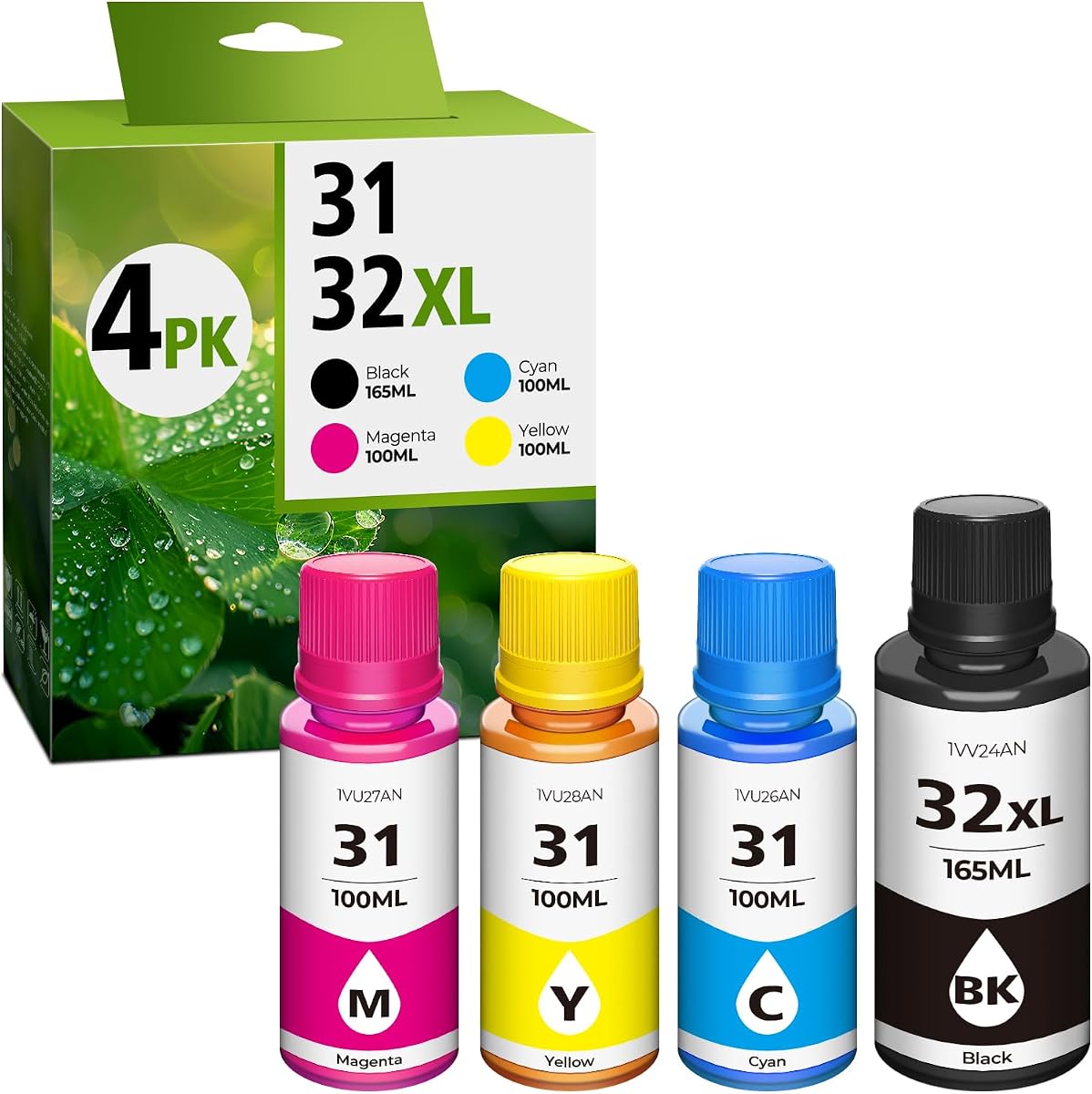
The 31 Ink 32XL Black Ink Bottle Set is a high capacity refill option compatible with various HP Smart Tank models. With a rating of 4.4 stars it offers a cost-effective alternative for users looking to extend the life of their printer without using original equipment.
We may earn a commission when you buy through this link, at no additional cost to you.
Its standout quality is the high page yield of up to 9500 pages for black ink per bottle. This capacity reduces the frequency of replacements and provides exceptional value. The set includes cyan yellow and magenta bottles designed for seamless refilling with minimal effort.
While it is a dye ink formulation which differs from OEM pigment ink it works well for general printing needs. Users should clean the printer heads before refilling to ensure optimal performance. The design prevents leakage and mix-ups with uniquely keyed bottles.
This product is perfect for budget-conscious users who have an HP Smart Tank printer and want to save money on ink. It is ideal for offices or families that print frequently and need a reliable supply of ink without paying premium prices.
With a yield of up to 9500 pages per bottle this ink set significantly reduces the frequency of replacements.
The bottles are designed to fit specific printers ensuring that refilling is easy and mess-free for users.
We may earn a commission when you buy through this link, at no additional cost to you.
The Epson EcoTank ET-2980 is a wireless color all-in-one Supertank printer designed for worry-free printing at home. With a rating of 4.0 stars it offers a simple and efficient solution for users who want to avoid frequent ink replacements.
We may earn a commission when you buy through this link, at no additional cost to you.
Its key strengths include up to three years of ink included in the box and simple ink refilling using supersized tanks and EcoFit bottles. Each replacement set is equivalent to about ninety individual cartridges which saves money and reduces waste significantly.
While it recommends using genuine ink for optimal performance this ensures the printer lasts longer. The enhanced mobile printing from the Epson Smart Panel app makes it easy to print from a smartphone. The design prioritizes simplicity over complex features.
This printer is ideal for users who want a straightforward device that handles basic printing needs without technical fuss. It is suitable for home users who value reliability and low maintenance over advanced capabilities.
The unique EcoFit bottles make refilling simple without the worry of drying out or accidental spills.
Print and scan from the convenience of your smart phone using the enhanced mobile app features.
We may earn a commission when you buy through this link, at no additional cost to you.
The Epson EcoTank ET-2800 is a wireless color all-in-one Supertank printer designed for reliability and efficiency in home environments. With a rating of 4.0 stars it serves as a great entry level option for users transitioning from traditional cartridge printers.
We may earn a commission when you buy through this link, at no additional cost to you.
Its standout quality is the innovative cartridge-free printing system which eliminates tiny expensive cartridges. Each ink bottle set is equivalent to about ninety individual cartridges which saves money and reduces waste. The printer includes enough ink for up to two years of use.
While it is an entry level model it still delivers vivid detailed prints thanks to Micro Piezo Heat-Free Technology. The fire-off of 10 ISO pages per minute ensures that large jobs are finished easily without delay. It is simple to use for daily needs.
This printer is perfect for users who want to start using an ink tank system without investing in premium features. It is ideal for basic home printing needs where reliability and cost savings are the primary goals.
Fire off 10 ISO pages per minute to easily finish large jobs without waiting around for the device.
Choose this combination printer and save money on replacement ink bottles compared to traditional ink cartridges.
We may earn a commission when you buy through this link, at no additional cost to you.
Selecting the right ink tank printer involves evaluating several key factors that impact performance and cost.
Ink capacity is a critical factor because it determines how often you will need to buy replacement ink. Look for models that offer enough ink to last several years or thousands of pages out of the box. High yield tanks ensure that you can print large volumes without interruptions or additional costs for the duration of the ink supply.
Focus on printers that clearly state the page yield and the number of years of ink included to estimate total ownership cost accurately.
A mess-free refill system is essential for convenience and safety when managing high capacity tanks. Models that use uniquely keyed bottles prevent accidental mixing of colors and reduce the risk of spills. Easy access ports allow you to fill tanks quickly without removing the printer from its designated spot.
Choose a system that allows for easy refilling without complex tools or procedures to maintain a clean workspace.
Print speed impacts productivity especially if you are printing large batches of documents regularly. Look for models that offer consistent page per minute rates without long warmup times. Faster output ensures that you can complete tasks quickly and stay focused on your work without delays.
Prioritize printers that offer high speeds for both black and white and color documents to maintain efficiency.
Modern connectivity options like wireless and mobile printing make it easy to print from various devices. Support for AirPrint and smart apps allows seamless integration with smartphones and tablets without needing cables. Robust Wi-Fi ensures that multiple users can access the printer from different locations within the home.
Ensure the printer supports current wireless standards and offers intuitive mobile apps for easy navigation and control.
High resolution and advanced technology such as Micro Piezo Heat-Free ensure sharp text and vibrant colors. This is important for both professional documents and personal photos. Consistent quality means you will not have to reprint pages due to streaks or smudges.
Look for printers that offer high dpi settings to ensure clear graphics and legible text in all formats.
Paper tray capacity and types supported determine how much you can print at once. Automatic duplex printing saves paper and time for double-sided jobs. A large tray means fewer reloads and higher productivity for busy environments.
Choose a printer with adequate tray capacity and duplex support to minimize manual intervention during print runs.
A solid warranty protects your investment against defects and malfunctions. Look for manufacturers that offer long-term support and access to genuine ink supplies. Reliable customer service ensures that any technical issues are resolved quickly to minimize downtime.
Verify the warranty terms and availability of support resources before making your purchase to ensure long-term reliability.
Ink tank printers inherently reduce plastic waste compared to disposable cartridges. Models that emphasize zero cartridge waste contribute to environmental sustainability. Choosing a printer that supports genuine ink helps maintain quality while minimizing the need for frequent replacements.
Select a model that aligns with your environmental values by reducing waste and supporting sustainable printing practices.
When setting up your printer for the first time ensure that the ink bottles are stored upright to prevent leaks. Fill the tanks carefully following the color coding on the bottles to avoid mixing colors. Once filled allow the printer to run the initial calibration process to distribute ink properly through the system.
Regular maintenance is key to maintaining print quality. Clean the print heads periodically using the built-in cleaning utility if the output becomes streaky. Keep the paper tray loaded with high-quality paper to prevent jams and ensure smooth feeding during jobs.
Store the printer in a cool dry place away from direct sunlight to preserve the ink quality. If you plan to leave the printer unused for a long period run a small test print every few weeks to keep the nozzles clear and prevent drying.
Most ink tank printers come with enough ink to last anywhere from two to three years depending on your usage. Some models include enough ink to print thousands of pages out of the box which can significantly reduce your maintenance frequency. The longevity of the ink depends on how many pages you print weekly and whether you print primarily in color or black and white.
Ink tank printers are generally more cost-effective for high-volume printing since the refillable tanks hold much more ink than traditional cartridges. This design reduces the need for frequent purchases and lowers the overall cost per page. They are ideal for users who print regularly and want to avoid the hassle of changing small cartridges often.
While some users opt for generic ink to save money manufacturers often recommend using genuine ink to maintain optimal print quality and performance. Using non-genuine ink can sometimes lead to issues like clogging or damage not covered under the limited warranty. It is best to follow the manufacturer guidelines to ensure the longevity of the print head.
Yes most modern ink tank printers support mobile printing through dedicated apps and standard protocols like AirPrint and Mopria. This allows you to print documents and photos directly from your smartphone or tablet without connecting to a computer. Check the specific model specifications to confirm compatibility with your device operating system.
Refilling ink tanks is typically a simple process where you remove the tank cap and pour ink from the provided bottle into the designated slot. Many models feature uniquely keyed bottles to prevent accidental mixing of colors and ensure a mess-free refill. The tanks are designed to be easy access so you do not need to disassemble the printer.
Many ink tank printers offer high resolution and vibrant color output which makes them suitable for printing photos as well as documents. Models with advanced technologies like Micro Piezo Heat-Free ensure sharp details and rich colors on various paper types. While specialized photo printers exist many ink tank models provide sufficient quality for personal use.
In this guide we explored ten top-rated ink tank printers that offer reliability and cost efficiency for home and office use. The Canon MegaTank G3270 Epson EcoTank ET-2803 and HP Smart Tank 5003 stand out as the top choices for their balance of performance and ink capacity.
When selecting your printer prioritize features that match your specific needs such as print speed paper handling or wireless capabilities. Consider how much ink is included and the ease of refilling to ensure a hassle-free experience in the long run.
Remember that product availability and specific offers may change frequently so checking current listings is always advisable. By choosing the right ink tank printer you can enjoy consistent print quality and significant savings on consumables over time.